
Best Minecraft Skin Editors: 7 AI and Manual Tools Compared
Compare 7 Minecraft skin editors and AI generators, with pricing, desktop screenshots and notes from our lighthouse keeper tests.
Our pick for an AI Minecraft skin generator and editor is PixelSkin: generate a skin from text or a reference image, refine it with natural-language instructions, and paint details directly on the 3D model. SkinGenerator.io offers text-to-skin generation, while Lumen Weaver accepts text or a reference image and offers both Slim and Wide models. For manual pixel art, The Skindex offers a direct workspace, PMCSkin3D has Basic and Advanced modes, and Blockbench also supports 3D modeling. Below, we compare what we could check in each editor and explain where our testing stops.
We tried basic painting or setup in PixelSkin, The Skindex, PMCSkin3D and Blockbench in a desktop browser. We initially submitted the same prompt in SkinGenerator.io twice without a result; a later user-run attempt displayed four candidates for a near-identical prompt. We could not reach Nova Skin during our checks, so we have not ranked its hands-on experience. These are initial observations, not a timed test of finished skins or a full assessment of AI output. We subsequently ran one generation each in PixelSkin and Lumen, described below.
Disclosure: We make PixelSkin. This comparison includes our product and explains what we checked for each tool.
Best Minecraft skin editors at a glance
| Editor | Best starting point | Workspace | Cost | What to know |
|---|---|---|---|---|
| PixelSkin | Text and image AI generation, plus editing | Browser, AI and 3D painting | Manual editing free; AI uses credits | Classic arms only; AI requires sign-in |
| SkinGenerator.io | Text-to-skin generation | Browser, text prompt | 5 free generations; 50 more for $2.49 | Four candidates observed; export not verified |
| Lumen Weaver | Text or image generation with model choices | Browser, 2D/3D preview | 5 points on sign-up; paid plans from US$5 / 30 days | Slim and Wide options; generation requires login |
| The Skindex | Quick manual edits | Browser, 3D painting | Editor available free | Classic and Slim selector; ads take up page space |
| PMCSkin3D | Skin artists who want a choice of modes | Browser, Basic and Advanced | Free editor | Separate download and community publishing controls |
| Blockbench | Skin makers who also build models | Browser or desktop app | Free | More setup and a larger interface |
| Nova Skin | Further option to investigate | Browser editor | Verify before choosing | Could not access during our test |
Prices and product details can change. The Nova Skin entry is not based on a completed hands-on test.
How we checked the editors
On November 15, 2026, we opened the sites in a desktop browser. In PixelSkin, Skindex, PMCSkin3D and Blockbench, we entered the painting workspace and made a small mark, noting the initial interface and visible controls. For SkinGenerator.io, our two attempts remained in progress after at least two minutes each. A subsequent user-run attempt displayed four candidates; its prompt had minor spacing differences, and its elapsed time was not recorded. For Lumen Weaver, we inspected its workspace and pricing and ran one text-to-skin generation. In Blockbench, we first created a Minecraft Skin project. Nova Skin timed out in our test environment; that does not mean it is unavailable to everyone.
These were exploratory checks. We did not finish the same character in each manual editor, measure manual completion times, import the downloaded skins into Minecraft, or compare mobile experiences. We ran one text-to-skin generation each in PixelSkin and Lumen and checked the exported file dimensions. The lighthouse comparison did not test image-based generation or follow-up natural-language edits in any product. Use these observations as starting points; they are not an exhaustive ranking.
PixelSkin: AI skin generation and editing with hands-on control
PixelSkin's editor brings the full workflow together: start from a text description or reference image, ask for changes in natural language, and refine the skin by hand on the 3D model. These capabilities make it our first choice for creators who want to develop an idea beyond the first AI result. In our guest session, the editor opened with a character already on the canvas. We selected the brush and a yellow swatch, painted a body pixel and saw Undo become available. The workspace also displayed controls for viewing the front, back and sides, showing the outer layer and previewing a walk.
For a separate example of natural-language editing, our AI skin guide documents a knight edit with before-and-after PNGs. In that one example, 44 pixels changed, all in the head regions; this does not guarantee that future edits will stay local or satisfy every detail. Our lighthouse test did not exercise image input or a follow-up instruction.
Manual painting, supported PNG import and export are free; AI generation and edits require an account and credits. The Starter pack costs $4.90 for 150 credits; prices checked November 15, 2026. In one follow-up test, we asked for a lighthouse keeper in a yellow raincoat, dark boots, a grey beard and a navy hat. During generation, the automatic review reported a blank face; the final preview showed eyes and a beard. The front showed the yellow coat and navy hat, and the back carried the coat and grey hair. The job had finished by our check at 48 seconds; the interface showed a total charge of 10 credits for painting and review. The downloaded file was a 64 × 64 PNG with an alpha channel. This was one sample, not a typical-time or quality benchmark, and we did not import it into the game.
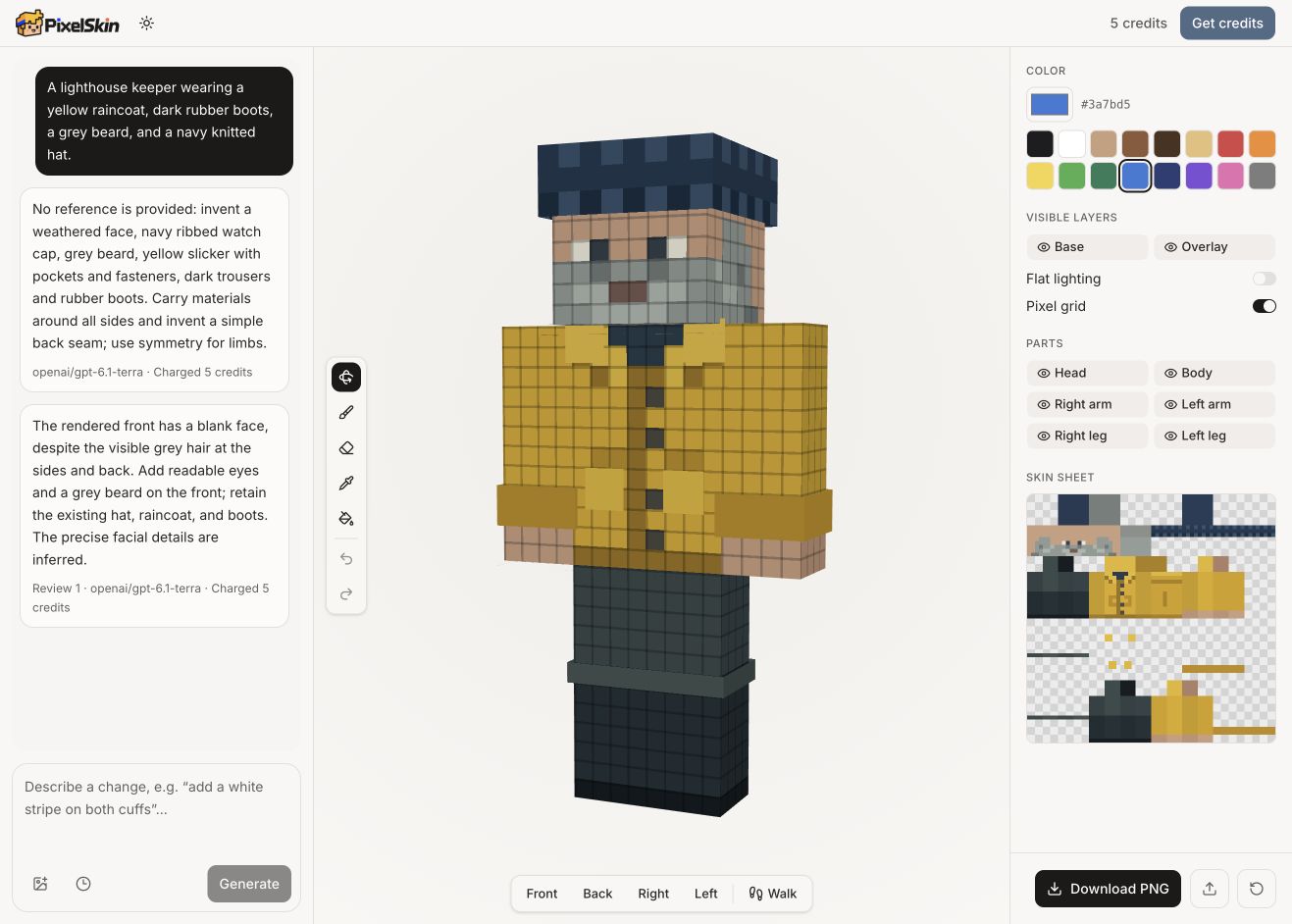
Our PixelSkin AI result after its automatic review.
PixelSkin currently supports Classic arms, not Slim. Choose a Slim-capable editor if three-pixel arms are essential.
SkinGenerator.io: text-to-skin generation
SkinGenerator.io is a separate AI skin generator from Monadical. Our first two attempts with the lighthouse keeper prompt did not return a result during two-minute checks. A later user-run attempt displayed four candidates using a near-identical prompt; it omitted spaces in “ayellow” and “boots,a” and included a line break. Its generation time was not recorded, so it cannot be compared with our timed PixelSkin and Lumen checks.
The four previews show grey beards and yellow and navy details. The lower-right candidate has a predominantly yellow outfit and dark boots; the others use more grey or blue. Hat colors vary, and the previews alone do not establish how well every face of each skin matches the request. We tried selecting the lower-right candidate, but the selection remained loading. A later check returned to a different skin, so we could not verify an export of the lighthouse keeper. The screen displayed 5 credits before selection; the button said one credit per generation, but final debit was not verified.
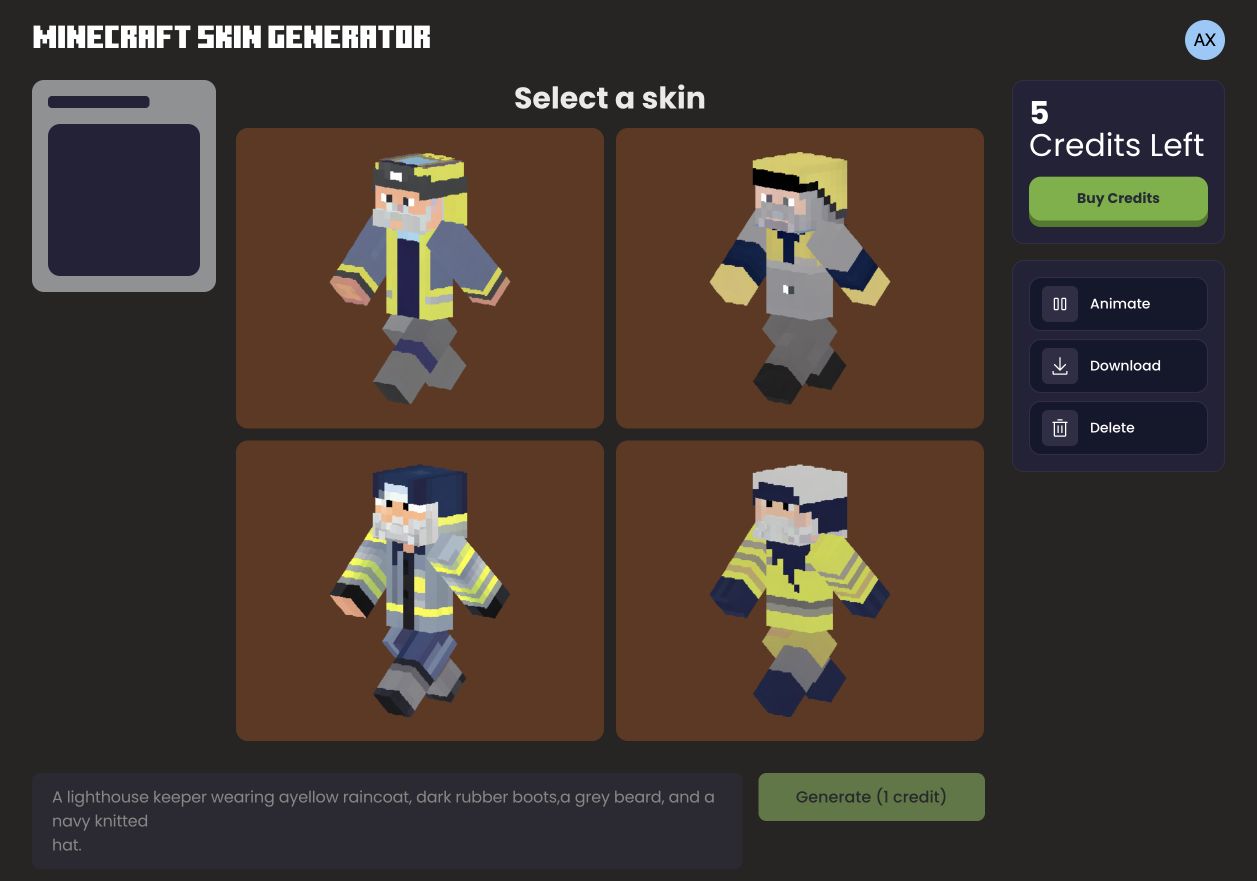
The four candidates shown after the user-run attempt. The prompt contains small spacing differences from the other tests.
Its published plans list five free generations. The paid options list 50 additional generations for $2.49, 125 for $4.99, or 333 for $9.99, along with access to newer models. Prices were checked on November 15, 2026. The site describes quantities as generations; PixelSkin uses credits and its automatic review may consume additional credits. Package prices alone do not establish a cost per finished skin.
Monadical has also published Minecraft Skin Generator XL model weights, based on Stable Diffusion XL and labeled OpenRAIL, together with a GPL-3.0 code repository. The repository describes its hosted website version as closed source; it does not establish which exact model or version the website currently runs.
For someone starting with words, both products advertise text-to-skin generation. PixelSkin also supports image references, natural-language edits, and manual 3D painting in its editor. Our checks did not establish whether SkinGenerator.io offers comparable editing or image-input features. A repeat test with the exact same prompt, completed export and consistent evaluation is still needed for a stronger comparison.
Lumen Weaver: text and image generation with Slim or Wide arms
Lumen Weaver offers text-to-skin, image-to-skin, upload and editing modes. In the guest workspace, we saw controls for 64×64 and 128×128 HD sizes and for Slim or Wide arms. Its interface says 64×64 results can be touched up in a pixel editor; its HD option requires a compatible client. For a follow-up test, we signed in, selected 64×64 and Wide arms, and used the same lighthouse keeper prompt as the PixelSkin test. We left Lumen’s default style weights and random seed settings unchanged.
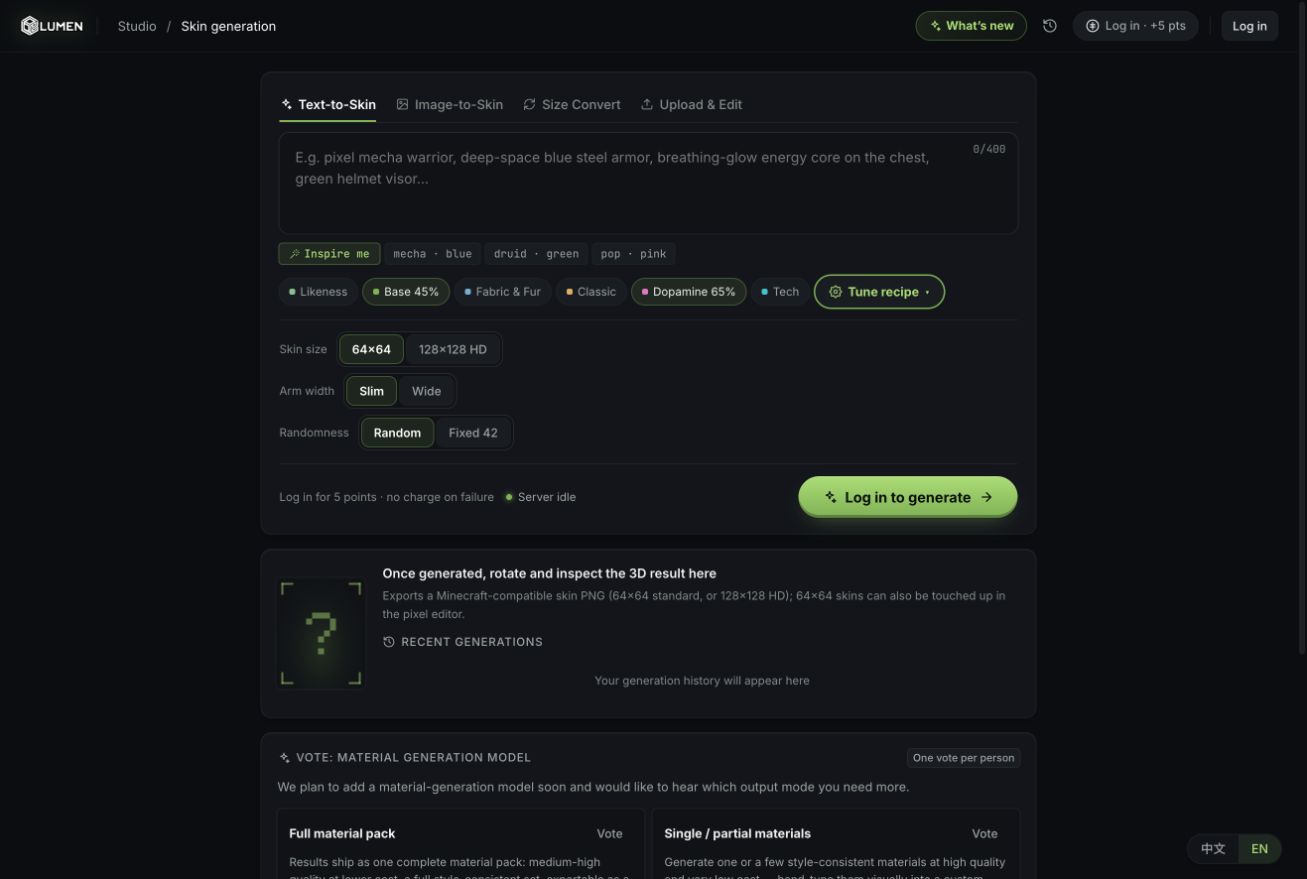
Lumen Weaver’s guest workspace before our generation test.
The pricing page lists one point per generation, five non-expiring points on sign-up, and one daily check-in point valid that day. Its English page lists Starter at US$5, Pro at US$10, and Studio at US$20 for 30 days, each including 50 non-expiring points and different daily check-in amounts. When we opened the Starter checkout, it said card checkout outside mainland China was still being finalized and no payment could be taken yet. Prices and availability were checked November 15, 2026.
The result was marked complete by our check at 19.2 seconds; the preceding check at 16.5 seconds still showed it generating. Its preview showed a navy hat, grey beard and yellow outfit, with yellow trousers and dark boots visible below them. The account’s transaction history showed a one-point generation charge, leaving four points from the five-point sign-up bonus. The downloaded PNG measured 64×64 and had an alpha channel; we did not import it into Minecraft.
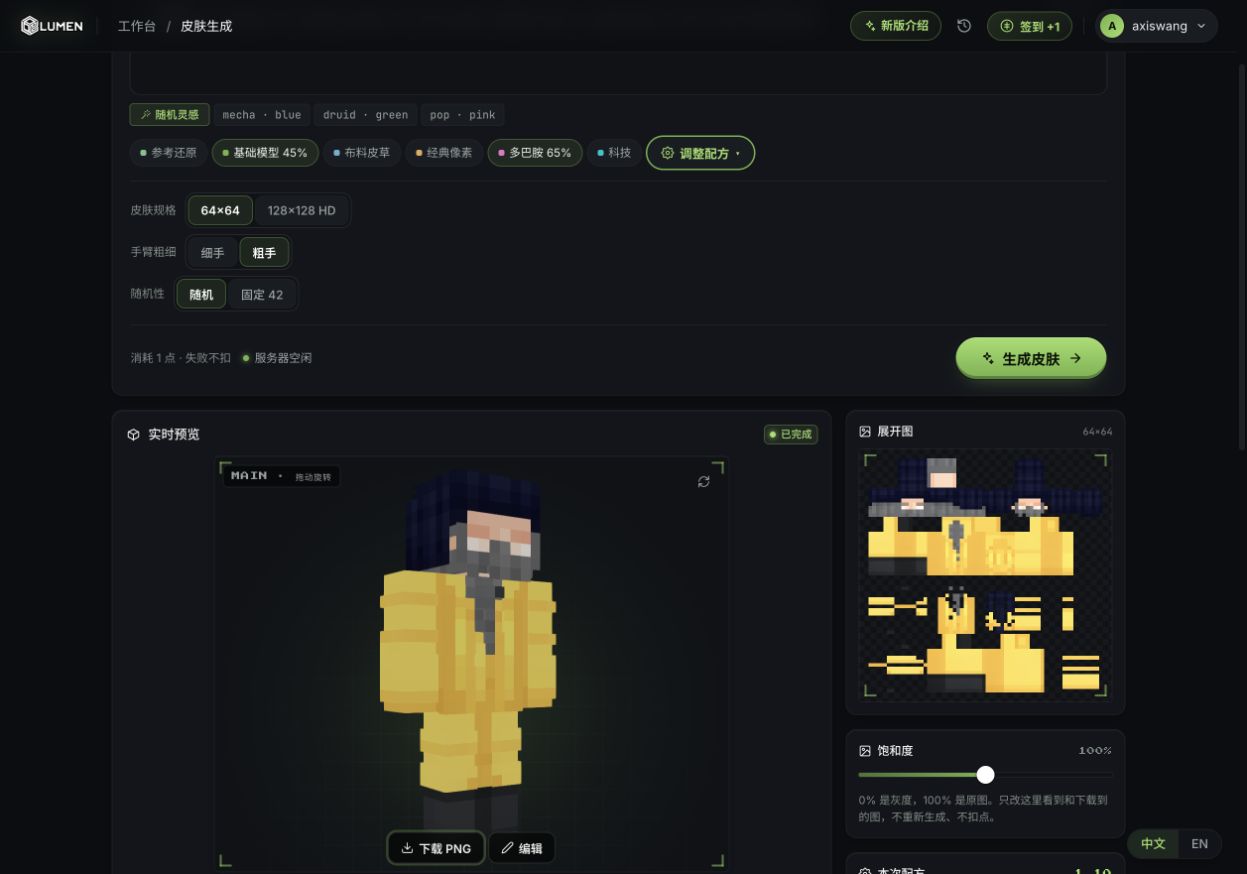
Our Lumen result from the same prompt, using the default style recipe and a random seed.
In our single PixelSkin run, the outfit used dark trousers; its review identified a blank face, and the final preview showed eyes and a beard. PixelSkin had completed by our 48-second check and showed 10 credits charged. Lumen reached a completed state by 19.2 seconds and its account history recorded a one-point charge. These are individual observations, not typical speeds, equivalent prices, or a quality ranking: the systems use different models, settings, random sampling and billing units. Lumen is also worth considering for Slim arms or its HD option; PixelSkin currently exports Classic 64×64 skins and combines text and image generation with natural-language edits and manual 3D painting.
Three AI generators: the lighthouse keeper results
We used the prompt “A lighthouse keeper wearing a yellow raincoat, dark rubber boots, a grey beard, and a navy knitted hat.” PixelSkin and Lumen received that text. The SkinGenerator.io attempt had small spacing differences. Each column describes one observed run, not an average or a complete assessment of the product.
| PixelSkin | SkinGenerator.io | Lumen Weaver | |
|---|---|---|---|
| What appeared | One skin with a yellow coat, dark trousers, navy hat and grey beard after automatic review | Four candidates with grey beards and varying yellow, blue and grey outfits | One skin with a yellow outfit, navy hat, grey beard and dark boots |
| Observed time | Complete by the 48-second check | Not recorded for the attempt that displayed candidates | Still generating at 16.5 seconds; complete by 19.2 seconds |
| Cost shown | 10 credits for painting and review in this run | 1 credit per generation shown; final debit unverified | 1 point charged in this run, per account history |
| File check | 64×64 PNG, alpha present | Selection stalled; no export verified | 64×64 PNG, alpha present |
| Editing and models | Text and image generation, natural-language edits and manual 3D painting; Classic arms | Editing and model options not verified | Pixel editor advertised; Slim and Wide options visible |
PixelSkin’s automatic review reported an initially blank face, and the final preview showed eyes and a beard. SkinGenerator.io offered four distinct directions, including a yellow-clad candidate; we could not complete selection or inspect its exported texture. Lumen’s visible front showed a yellow outfit, navy hat, grey beard and dark boots, and its interface offered Slim and Wide arms. We did not inspect every side of all three results or import them into Minecraft.
The apparent timing differences are not a benchmark. PixelSkin’s time is an upper bound from a single check, SkinGenerator.io’s successful preview was not timed, and Lumen used its default style recipe and a random seed. Credits, generations and points are different units, and plan terms differ; the numbers above should not be read as directly comparable prices per finished skin.
The Skindex: a direct way to start painting
The Skindex opens directly into a skin editor alongside its community skin site. In our check, choosing the pencil and clicking the blank model produced a colored pixel. The toolbar included an eraser, bucket, color picker and mirror toggle, while a selector offered Classic and Slim arms.
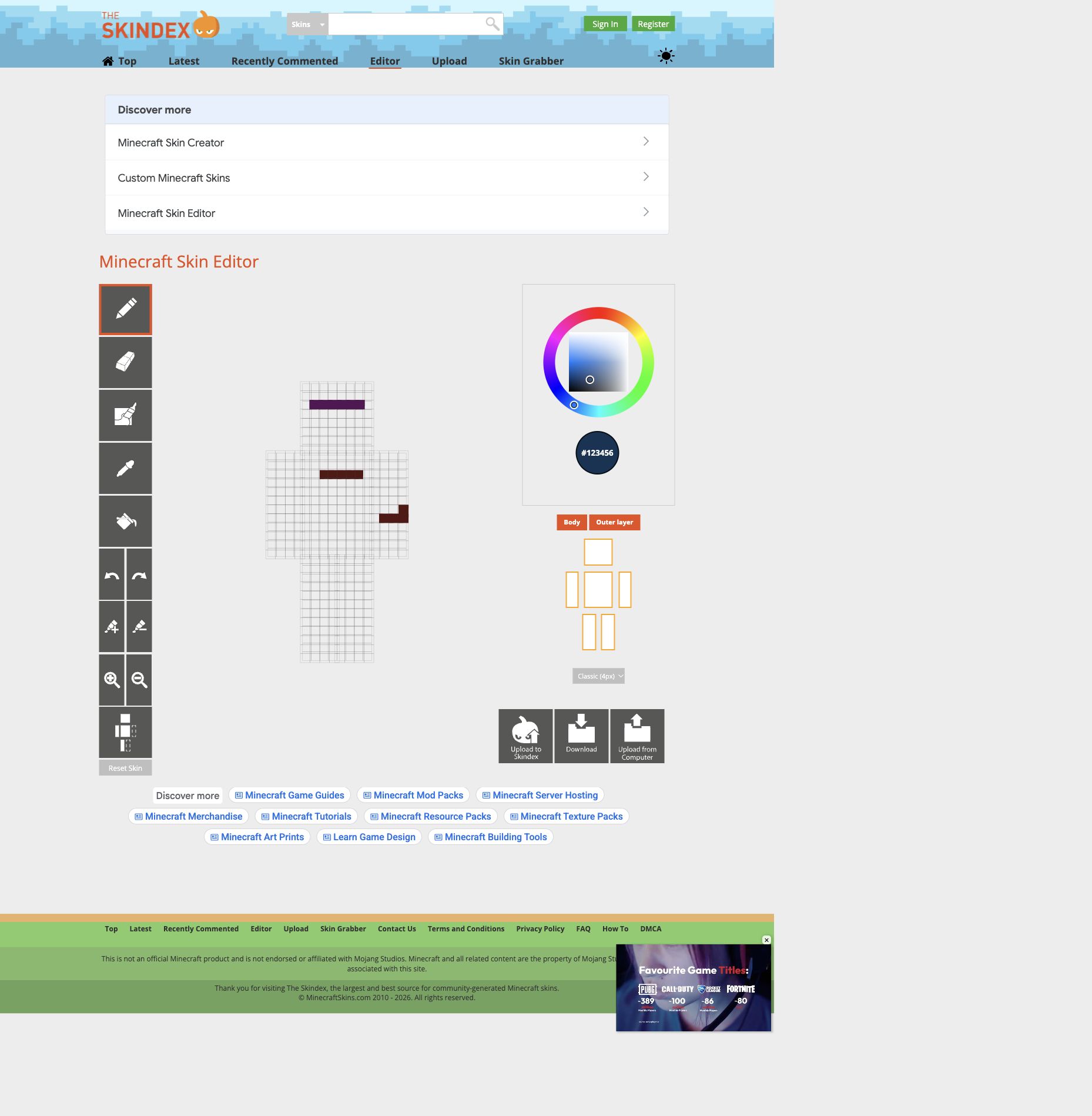
The Skindex page and complete editor workspace during our browser check; the colored marks are existing test strokes, not a completed character.
The essential drawing controls are easy to find. One trade-off is page space: a large advertisement appeared above the editor, pushing part of the workspace down the screen. If your goal is to find a skin and then make a few manual changes, it is a sensible first stop. We did not test the download or publishing flows.
PMCSkin3D: basic and advanced workspaces
Planet Minecraft's editor asks you to choose Basic or Advanced before entering. In Basic mode, we dismissed a What's New panel and painted a black pixel on the blank 3D model. Download and Publish appeared as separate controls. The site's own guide also describes custom brushes, palettes and pose tools; we did not test those advanced features in this session.
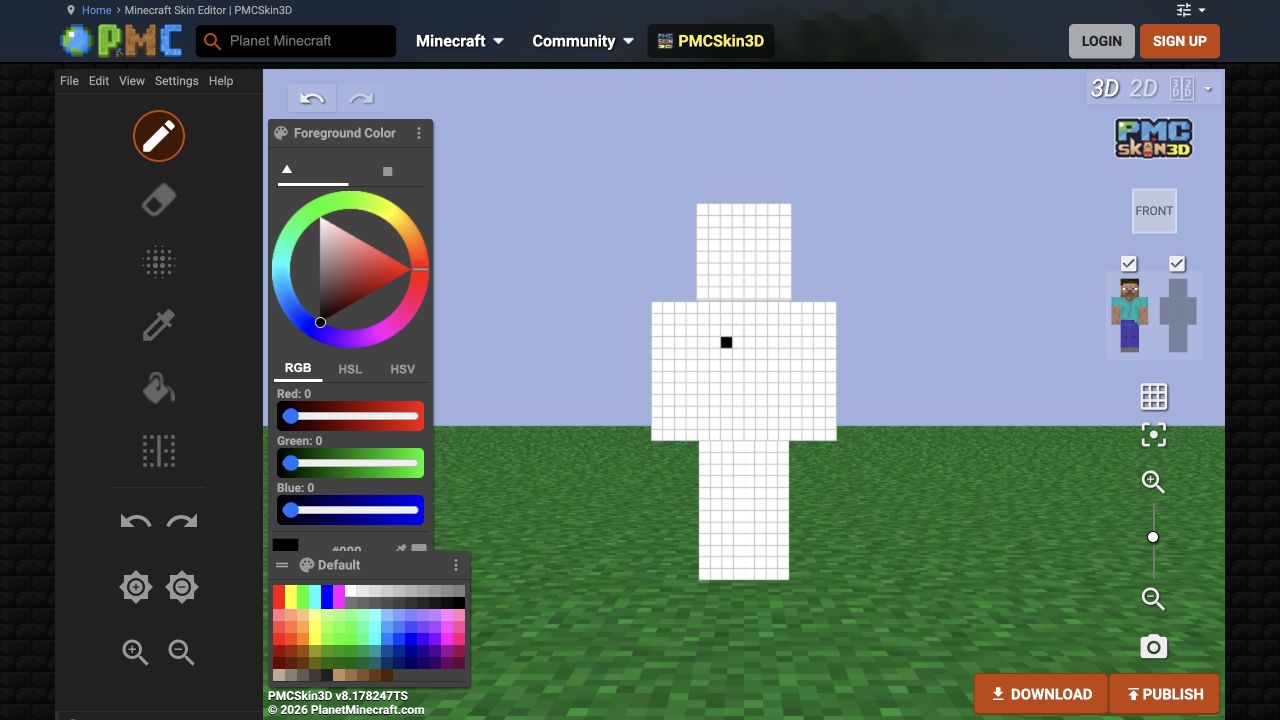
PMCSkin3D Basic Editor after a single test brushstroke.
The mode choice is useful if you want a simpler beginning and the option to explore more later. It also adds a decision before painting, and the interface takes more orientation than a single-purpose canvas. If you want a community around your creations, Planet Minecraft is worth exploring, but check its current account requirements before publishing.
Blockbench: useful beyond player skins
In Blockbench's web app, we selected Minecraft Skin, created a new model and accepted the default wide-player template. Painting the model's head also showed the mark on the flat texture alongside it. We could see pose controls and individual body-part visibility in the workspace.
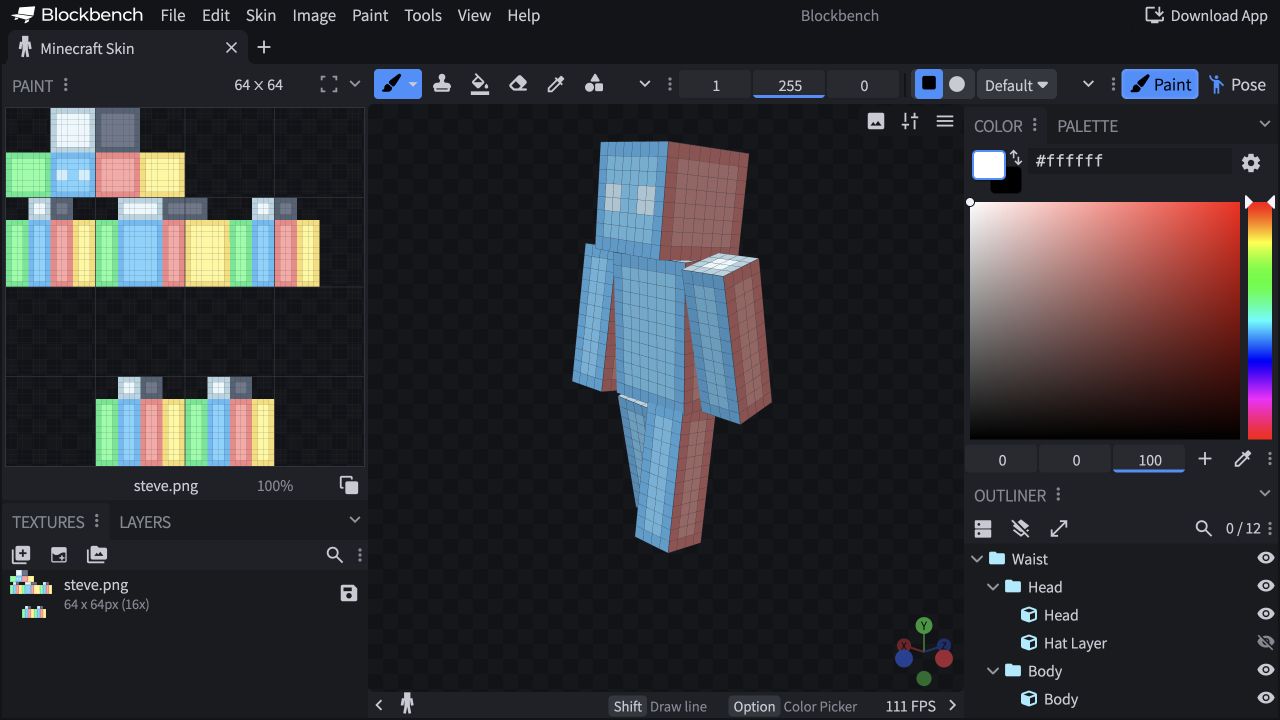
Blockbench’s generated template shows the flat texture and 3D model together.
That side-by-side view is helpful when you want to understand how a 3D surface maps to the PNG. Blockbench also supports broader modeling workflows, which makes its interface more involved than a dedicated quick editor. Expect a little setup before the first brushstroke; we did not test exporting the result.
Nova Skin: not assessed in this session
Nova Skin is included because readers commonly encounter it when looking for Minecraft skin editors. Our browser attempts timed out, so we could not inspect its current editor, verify its pricing or test a skin. We would not assign it a position in a hands-on ranking until we can complete the same checks as the other tools.
Which editor should you choose?
- Choose PixelSkin for an AI skin generator and editor that starts from text or a reference image and lets you refine the result with natural-language instructions and manual 3D painting; it currently exports Classic skins.
- Consider SkinGenerator.io if you want to try text-to-skin generation and its five advertised free generations; sign in to explore the workflow.
- Consider Lumen Weaver if you want text or image input and a choice of Slim or Wide arms; generation requires an account.
- Choose The Skindex for a direct manual editor connected to a skin-browsing site, provided the page layout works for you.
- Choose PMCSkin3D if you want to start in Basic mode and explore more advanced skin-art tools later.
- Choose Blockbench if seeing the 3D model and flat texture together matters, or you also make models.
- Try Nova Skin yourself if it is available on your connection; we could not verify it during this session.
Before committing to a tool, create a small test skin and check the downloaded PNG on your intended device. Java and Bedrock have different import flows, and Bedrock consoles may not support importing a custom PNG through the usual Dressing Room flow.
Ready to make your own? Follow our first skin project, or see how to use a reference photo to create a Minecraft skin.
Frequently asked questions
Are Minecraft skin editors free?
The Skindex, PMCSkin3D and Blockbench provide free editors. PixelSkin's manual editor is free, while its AI features consume credits. SkinGenerator.io advertises five free generations and paid generation packages; Lumen Weaver lists five sign-up points and daily check-in points. Check each provider's current terms before starting.
What size should a Minecraft skin be?
A modern standard player skin is typically a 64 × 64 PNG texture. The image is an unfolded texture, not a screenshot of the 3D character. Make sure the arm model matches your design when applying it.
Can I use the same skin on Java and Bedrock?
A standard PNG can be used in Java and on Bedrock devices that support custom skin imports. The steps vary by platform, and console Bedrock does not offer the same custom PNG import flow. See our skin-changing guide for the process.
相关 Minecraft 皮肤指南
- 如何制作 Minecraft 皮肤:完整做出你的第一个角色
跟着养蜂人案例完成皮肤制作:生成或导入、检查四个方向、精修图层、导出 64×64 PNG,并在游戏中使用。
- Minecraft 皮肤模板:看懂 64×64 布局与图层
用可交互的 Classic UV 图定位身体正面,比较基础层与外层,下载真实 64×64 模板,并了解实际导入限制。
- 如何更换 Minecraft 皮肤:Java、基岩版与主机
按设备找到正确的皮肤导入路径,检查 PNG 文件、匹配 Classic 或 Slim 手臂,并排查上传和显示问题。