A starlight wizard wearing a deep purple robe with gold stars, a tall pointed hat, silver hair, a blue belt and dark boots.
Use this promptCool Minecraft Skins to Make Your Own
Browse original wizard, knight, explorer and hoodie skin examples. Preview real 64×64 skins in 3D and use a prompt to create your own variation.
Find your next skin
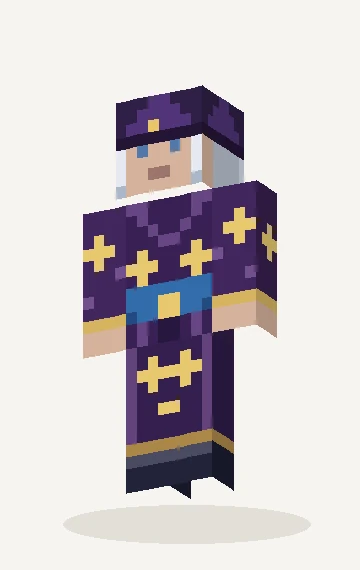
Starlight wizard
A starlight wizard wearing a deep purple robe with gold stars, a tall pointed hat, silver hair, a blue belt and dark boots.
Create a skin like thisA forest elf with copper hair, pointed ears, a deep green cloak, tan tunic, leather belt and brown boots.
Use this promptA fantasy knight in charcoal armor with glowing orange ember lines, a red cape and a black helmet with amber visor.
Use this promptAn astronaut in a white space suit with a dark blue visor, orange mission patches, gray gloves and sturdy white boots.
Use this promptA deep sea diver wearing a teal diving suit with brass accents, a round copper helmet, dark boots and a small oxygen pack.
Use this promptA mountain explorer in a warm coral parka with a cream scarf, dark hiking pants, brown boots and a small backpack.
Use this promptA cheerful character wearing an orange fox hoodie with pointed ears, a cream belly, dark pants and white shoes.
Use this promptA cute character in a black and white panda hoodie with round ears, white sleeves, black shorts and red shoes.
Use this promptA playful character in a soft pink axolotl hoodie with side gills, cream overalls and lavender shoes.
Use this promptBrowse by theme, then change one thing
These examples are PixelSkin-generated 64×64 skin textures with matching previews. Choose Fantasy, Adventure or Cute to narrow the gallery, then select a character for a closer 3D look. Each “Use this prompt” link opens the editor with that description ready. It starts a new variation when you send the request; it does not load an exact copy of the example texture.
AI generation requires sign-in and credits. You can use the manual tools and export a PNG for free. Visit pricing and credit packs before generating if you want to plan how many variations to try.
Fantasy skins: wizard, elf and knight
The starlight wizard uses gold details against a purple robe, while the forest elf builds around a green cloak and copper hair. The ember knight takes a different route with dark armor and orange seams. Choose the main feature you like, then change a color or clothing item in the prompt to make the character yours.
Avoid packing every surface with detail. A contrasting belt or helmet visor can be easier to recognize in-game than a dense chest pattern. Inspect the sides of the head and the backs of the arms after generation, where a design can lose its continuity.
Adventure skins: astronaut, diver and explorer
The astronaut’s white suit leaves room for a dark visor and orange patches. The diver pairs teal fabric with copper, and the mountain explorer uses a warm parka with a cream scarf. These palettes keep each outfit readable across the small texture surfaces.
A backpack or helmet in these examples is painted onto the standard player model. The PNG does not add new geometry or equipment. Use the outer layer for a little depth, then inspect the walk preview before downloading.
Cute skins: fox, panda and axolotl hoodies
Hoodies work well as a first project because the body and sleeves share a clear shape. Keep the face separate from the hood’s outline and use one contrasting color for shoes or cuffs. For a fox variant, try a navy hoodie with orange accents; for a panda, keep broad black and white areas before adding shadows.
Animal features are interpreted within the standard Classic model. Check the top and sides of the head to see whether the texture suggests the ears or gills clearly enough. You can repair a few pixels manually in the Minecraft skin editor.
Export a skin you can wear
PixelSkin currently supports Classic four-pixel arms and exports 64×64 PNG files. Select Classic or Wide when applying your skin. Slim editing is not supported. Java and Bedrock devices with custom PNG import can use the exported texture; Bedrock consoles do not offer this import flow. Follow how to change your Minecraft skin for installation steps.
For your next design brief, explore Viking, ninja, chef and 12 other outfit concepts in Minecraft skin ideas. Those concepts are separate from the finished examples in this gallery. If you have a picture of an outfit, try photo to Minecraft skin. To write a prompt from scratch, return to the AI Minecraft skin generator.